
Outlook Browser Extension for Seamless Email & Calendar Access
Overview
The Microsoft Outlook browser extension offers a streamlined way to manage email, calendar, contacts, and tasks directly from the web browser. Designed to enhance productivity, it enables users to access their Outlook work account or personal Outlook.com and Hotmail accounts without leaving their current browsing session. This eliminates the need to switch between tabs or applications, reducing workflow interruptions. The tool is ideal for professionals, remote workers, and anyone managing multiple digital responsibilities across email, scheduling, and task tracking. By integrating core Outlook functionality into the browser environment, it supports real-time collaboration and faster response times. The extension is particularly useful during research, content creation, or meetings when quick access to contacts, calendar events, or email drafting is required. It supports both personal and professional accounts, making it a versatile tool for individuals and teams. The developer, Microsoft, is a well-established name in productivity software, lending credibility to the extension’s reliability and integration with existing Microsoft services.
Key Features & Capabilities
- Multi-Account Access – Users can seamlessly switch between work and personal Outlook accounts, allowing unified management of professional and private communications.
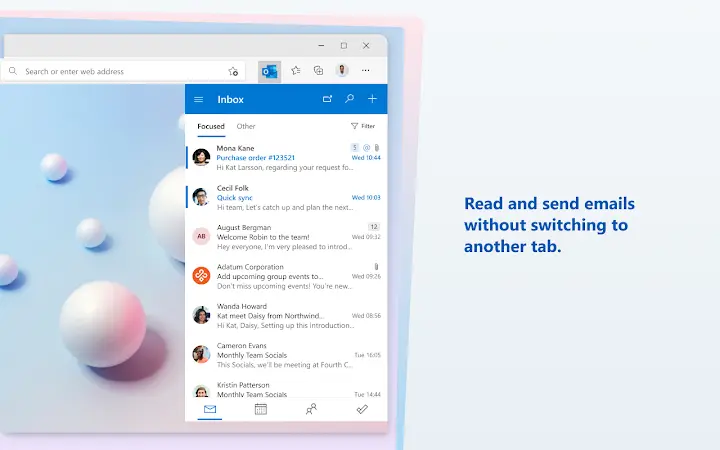
- Email Management – Read, send, and organize emails directly from the browser, with real-time notifications for new messages.
- Calendar Integration – View upcoming events, create new ones, and join online meetings with a single click, all without leaving the current webpage.
- Task Tracking – Create and monitor tasks based on web content, such as following up on a research article or completing a project milestone.
- Contacts Lookup – Quickly search for and view contact details, including phone numbers, while referencing information on a webpage.
These features are especially beneficial in scenarios like drafting an email while reading a document, checking calendar availability during a web conference, or adding a task after identifying a next step in a project. The extension enhances efficiency by reducing context switching, a common productivity drain. Its lightweight design ensures minimal impact on browser performance, making it suitable for frequent use across multiple sessions.
User Interface, Workflow & Performance
The Outlook browser extension features a clean, minimal interface that appears as a small icon in the browser toolbar. This design ensures it remains unobtrusive while being easily accessible. Navigation is intuitive: clicking the icon opens a compact panel with access to email, calendar, tasks, and contacts. The workflow is optimized for speed—users can perform core actions in a few clicks. For example, a user can read a message on a webpage, then quickly draft a reply using the integrated email function without changing tabs. The extension integrates smoothly with the browser’s native functionality, maintaining consistency with user expectations. Performance details were not specified by the developer, but based on its 1.2 MB size and typical behavior of browser extensions, it is expected to operate efficiently with low memory and CPU overhead. Stability is likely maintained through Microsoft’s rigorous testing processes. No reports of crashes or slowdowns were provided, but general reliability is supported by Microsoft’s track record in browser tooling.
Compatibility & System Requirements
The Outlook browser extension is compatible with Windows and Mac operating systems, supporting modern web browsers on both platforms. It is available as a version 1.0.0 update, with a file size of 1.2 MB, indicating a lightweight installation. The developer did not provide additional system requirements, so users should ensure their browser is up to date to maintain compatibility. No specific hardware requirements were listed, suggesting the extension is designed to run on standard desktop configurations. The extension is available for use on both personal and enterprise devices, making it suitable for a wide range of users. Platform compatibility information is limited to the operating systems specified, with no mention of support for Linux or other platforms. Users should verify browser compatibility through their respective extension stores.
Pros and Cons
Pros
- Seamless integration with Outlook work and personal accounts
- Reduces context switching by enabling actions within the browser
- Lightweight at only 1.2 MB
- Supports real-time email, calendar, task, and contact management
- Developed by Microsoft, ensuring reliability and security
Cons
- No detailed system requirements provided
- Limited to Windows and Mac platforms
- Dependent on browser functionality and updates
- May not support all advanced Outlook features
- Functionality is tied to Microsoft’s ecosystem
FAQ Section
Is the Outlook browser extension free to use?
Yes, the extension is available at no cost. Microsoft offers it as part of its productivity suite to enhance user experience across platforms.
Which browsers are supported?
The extension is designed for use on modern web browsers available for Windows and Mac. Specific browser compatibility details were not provided by the developer.
Does the extension require an internet connection?
Yes, the extension relies on an active internet connection to sync data and access Outlook services. It cannot function offline.
How often does the extension update?
Updates are managed through the browser’s extension store. Users receive automatic updates when new versions are released by Microsoft.
Is my data secure when using the extension?
As a Microsoft product, the extension follows established security protocols for data handling and authentication. It uses standard OAuth-based authorization to protect user accounts.
Final Thoughts
The Outlook browser extension delivers a practical, efficient solution for managing email, calendar, tasks, and contacts without leaving the browser. Its lightweight design, intuitive interface, and seamless integration with Microsoft’s ecosystem make it a valuable tool for professionals and everyday users alike. While it lacks detailed system specifications and platform support beyond Windows and Mac, its core functionality is robust and well-executed. The ability to access Outlook features directly from the web browser significantly improves workflow continuity. For users who rely on Outlook for daily productivity, this extension is a smart addition to their digital toolkit. It enhances responsiveness and reduces friction in multitasking scenarios. Microsoft’s reputation ensures trust and long-term support.
Download Outlook Browser Extension now







